

Knowledge Center
Getting Started
Get to know your system.
What is the Kora Smart Panel?
The Kora Smart Panel replaces your traditional breaker box with a smart electrical panel that gives you real-time visibility and control over every circuit in your home. It connects your solar, batteries, EV chargers, and the grid into a single system you manage from the Kora app.
As part of Kora’s Founder’s Edition home energy system, it works alongside Powerblocks and the Kora app to deliver reliable, efficient, and cost-effective energy management.
What You Can Do
- See everything: Monitor energy use in real time across all 12 circuits—broken down by room or appliance.
- Control from anywhere: Turn individual circuits on or off through the Kora app, or set schedules that run automatically.
- Stay powered during outages: Prioritize which loads stay on when the grid goes down. Essentials like your fridge, Wi-Fi, and medical equipment keep running while non-critical circuits are shed automatically.
- Save on energy costs: Automate load shifting with time-of-use (TOU) scheduling and demand response programs.
- Earn with Energy Trading: Join Kora’s Virtual Power Plant (VPP) to sell excess stored energy back to the grid during high-demand periods.
- Connect solar and batteries: Integrate with Kora Powerblocks or compatible solar systems to maximize self-consumption and backup readiness.
How It Works
- High-performance relays: Every circuit is switched through solid-state relays that are faster and more precise than mechanical breakers, with built-in current, voltage, and power measurement.
- Layered safety: Overcurrent protection, arc fault detection, and surge protection—all compliant with UL and IEEE standards.
- Precision metering: A dedicated subsystem samples voltage, current, and power quality every 100 ms. Branch circuits use AC shunt sensors; mains and generator circuits use CTs. Both achieve ±1% accuracy.
- Smart communication: CANbus 2.0, RS-485, and GFP handle internal coordination with Powerblocks. Modbus TCP/IP, MQTT, IEEE 2030.5, and SunSpec handle external integrations and grid services.
Why Kora
- Future-proof: Over-the-air updates for the life of the panel. Your system keeps getting better.
- Peace of mind: Automatic backup, storm preparation, and the ability to go off-grid when you need to.
- Real savings: Lower or eliminate your utility bills by optimizing when and how you use energy.
- Sustainability: Maximize solar self-consumption and participate in clean energy programs.
Installation Requirements Checklist
Installing a Kora energy system involves more than just mounting the hardware. To ensure a safe, smooth, and code-compliant installation, please review the following requirements before scheduling your electrician or installer.
Site Requirements
- Service Size: Kora Smart Panel is rated for 50 - 200A service. Confirm your home’s main panel and service entrance are compatible.
- Space for Panel Replacement: The Smart Panel requires the same footprint as a traditional main panel or sub panel. Verify wall space, clearance, and accessibility.
- Minimum Clearances:
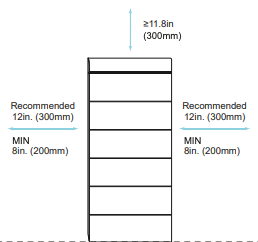
- Powerblocks
- Top clearance: 12”
- Side clearance (left & right): 8”
- Recommended: 12”
- Front clearance: 24” for service access
- Rear clearance: 1” between unit and wall
- Distance from openings (windows, doors, HVAC inlets, or other operable openings): 3’
- Smart Panel
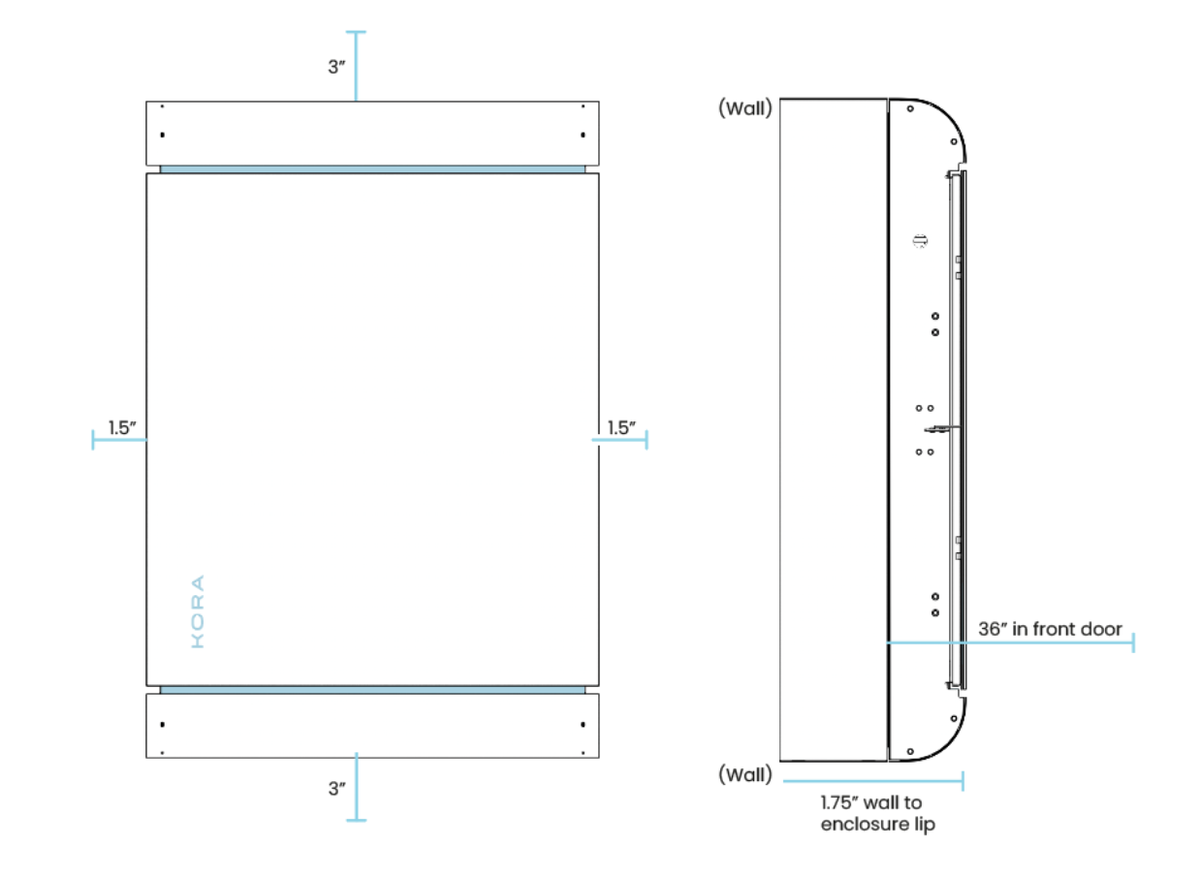
- Top clearance: 3”
- Side clearance (left & right): 1.5”
- Bottom clearance: 3”
- Front clearance: 36”
- required working space clearance per NEC 110.26
- Door swing arc: Full 180° clearance with no obstructions
System Size Reference
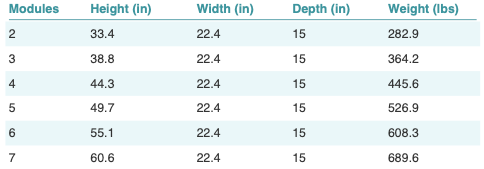
Individual component dimensions and weights
- Powerblocks
- Each battery module
- Dimensions (W x H x D): 22.4” x 6.5” x 15”
- Weight: 78.5 lbs
- Hybrid inverter
- Dimensions (W x H x D): 22.4” x 20.4” x 15”
- Weight: 112.44 lbs
- Base plate
- Dimensions (W x D): 22.4” x 15”
- Weight: 7.7 lbs
- Smart Panel
- Dimensions (W x H x D): 16.7” x 20.25” x 6.84”
- Weight: 50 lbs
Mounting Locations
- Powerblocks
- Indoor or outdoor ground-mount only(Type 4X enclosure).
- You will need a concrete slab or area of your foundation / garage to install the Powerblocks on.
- Minimum slab capacity: ≥700 lb (≥320 kg) static load (use a safety margin above the ~690 lb weight) if installing a full 7 Powerblock tower.
- Footprint: 22.4″ × 15.0″ clear, level surface.
- Stable surface, protected from flooding or standing water.
- Adequate clearance for ventilation (follow NEC + Kora spacing guidelines).
- Smart Panel
- Recommended Mounting Height (centerline): 60 in. above finished floor
- Indoor or outdoor installation. Outdoor installation must observe the following:
- Use only the factory-designated knockouts when opening conduit entries.
- Install listed watertight conduit fittings (hub-style, gasketed) appropriate to the conduit type.
- Where possible, choose a location that minimizes direct sunlight exposure to reduce thermal cycling on the enclosure and components.
- Do not mount the panel where it will be subject to direct spray from sprinklers, gutters, or pressure washers.
- Recessed installs are permitted for indoors only, outdoor recessed installations are not permitted..
- The framed wall cavity must provide adequate depth, and the enclosure must not be compressed by framing members or finish materials.
- Verify the cavity depth is at least 6.84 inches plus any finish material thickness.
- Never drill free-hand through the steel enclosure.
Environmental Requirements
- Powerblocks
- Operating temperature: -13°F to 131°F (derating above 104°F)
- Humidity: 0-100% (non-condensing)
- Altitude: 6560 ft
- Smart Panel
- Operating temperature: 14°F to 131°F (derating above 104°F)
- Humidity: 95% (non-condensing)
- Altitude: 6560 ft
Electrical Requirements
- Dedicated breaker space in the main panel for back feeding or connecting Powerblocks.
- Grounding: Install proper earth ground per NEC and local codes.
- 120/240V split-phase wiring meeting local utility and AHJ requirements.
- No separate backup subpanel needed. Backup priorities are managed digitally through the Smart Panel and Power App.
- Combiner box required if installing multiple Powerblocks stacks.
Installation Requirements
- All installation work must be performed by a licensed electrician familiar with NEC 2023 and local jurisdiction requirements.
- Electrical and building permits may be required. Contact your local authority before scheduling installation.
- If grid-tied with solar or storage, interconnection approval is likely required from your local utility.
- Final sign-off by the local building department, electrical inspector, or fire marshal who reviews and approves your system for safety and code compliance may be required before system activation.
Connectivity Requirements
- Wi-Fi or Ethernet connection is required for the Smart Panel and Powerblocks to communicate with the Kora Power App and Energy Trading platform.
- iOS or Android smartphone required for initial system setup and ongoing monitoring.
What’s NOT Needed with Kora
Unlike traditional solar + storage installations:
- No separate backup panel or sub panel. The Kora Smart Panel replaces this function.
- No manual breaker flipping during outages. Backup priorities are managed automatically.
In Short
Before installing, make sure you have the right service size, clear space, permits, utility approval, and internet connectivity. With these requirements met, your electrician can install Kora quickly and safely, giving you full control over your home’s energy.
Safety Certifications and UL Standards
Safety is at the core of the Kora system, after all, this is your home. Because the Kora Smart Panel and Powerblocks are permanently installed electrical equipment that integrate with your utility, solar, and battery systems, they must meet some of the most rigorous safety and performance standards in the energy industry.
Below are the certifications and UL standards that Kora products are designed to comply with:
Kora Smart Panel
The Smart Panel is classified as an electrical distribution and control panelboard, with safety requirements focused on:
- UL 67: Panelboards: Governs the construction and safety of residential and commercial panelboards.
- UL 916: Energy Management Equipment: Covers smart load management, monitoring, and control functions.
- UL 3141: Power Control Systems (PCS): Applies to systems that actively control the flow of power between the grid, storage, and loads.
Kora Powerblocks
Kora Powerblocks combine lithium-iron-phosphate (LFP) battery modules with a hybrid inverter in a modular, scalable design. To ensure safety and compliance across North America, Powerblocks are designed to meet the following UL and CSA standards:
- UL 9540: Energy Storage Systems and Equipment: Certification for complete residential/commercial energy storage systems (battery + inverter). CSA Certificate No. 80313310
- UL 9540A: Fire Safety Test Method: Evaluates thermal runaway behavior and fire safety of lithium-ion battery systems. Evaluated per CSA Reports No. 80313308 (module level) and 80313309 (system level)
- UL 1973: Batteries for Stationary Applications: Covers safety and performance requirements for lithium-ion battery modules in stationary storage. CSA Certificate No. 80313307
- UL 1741 SA / SB / CRD: Inverters and Controllers: Ensures grid-interactive inverters meet U.S. requirements, including support for advanced grid functions. CSA Certificate No. 80313303
- UL 1998: Software in Programmable Components: Certifies the safety and reliability of embedded control software. CSA certified as part of the UL 1741/ UL 1699B evaluation
- UL 1699B: Arc-Fault Circuit Interrupter (AFCI): Ensures detection and protection against electrical arcs in PV and battery systems. CSA Certificate No. 80313303
- CSA C22.2 No.107.1-16: Canadian standard for power conversion equipment. Binational compliance. CSA Certificate No. 80313303
Grid Standards
Kora Powerblocks also comply with leading grid interconnection standards:
- IEEE 1547-2018 / 1547a-2020 / 1547.1-2020: Interconnection standards for Distributed Energy Resources (DERs). CSA Certificate No. 80313303; interoperability verified per CSA Report No. 80313304
- California Rule 21: Certification for interconnection with California utilities. Certificate No. 80313303
- HECO SRD-V2.0: Compliance with Hawaiian Electric grid requirements. CSA Certificate No. 80313303
Why It Matters
- Safety for Your Home: Certified to the same standards utilities and inspectors require.
- Peace of Mind: Tested against fire, electrical, and thermal hazards.
- Future-Proof: Meets the latest IEEE and UL standards, ensuring long-term interconnection approvals.
Every Kora product, including the Smart Panel, Powerblocks, and Power App and Energy Trading, is designed and tested against rigorous UL, IEEE, and NEC standards. This ensures your system is not only powerful and flexible, but also safe, code-compliant, and approved by utilities across North America.
What's Included in Your Kora System
Kora is more than hardware. It’s a complete home energy system: smart hardware, intelligent software, and grid services. Designed to give you total control over how your home uses, stores, and earns from energy.
Smart Panel
The foundation of your system. The Kora Smart Panel replaces or upgrades your home’s electrical main panel (up to 200A) and gives you:
- Real-time visibility and control across 12 circuits, broken down by room or appliance.
- Remote on/off control from the Kora app. No need to touch a breaker.
- Automatic backup management that extends battery life from hours to days by shedding non-essential loads.
- Built-in overcurrent and arc-fault protection to keep your home safe.
Powerblocks
Modular battery storage paired with a hybrid inverter. Store energy from solar or the grid and use it when rates are high or the power is out.
- Each battery module stores 4 kWh of usable energy (LFP chemistry, 7,000+ cycle rated).
- Minimum 2 modules per stack (8 kWh), maximum 7 modules (28 kWh) per stack. Up to 4 stacks for 112 kWh total.
- 11.4 kW hybrid inverter manages energy flow between your home, batteries, solar, and the grid.
Kora App
Your command center. From your phone, you can:
- Track energy use by room, circuit, or appliance, in real time or over any time period.
- Control circuits remotely and set automation schedules.
- Get alerts, insights, and savings reports to make smarter energy decisions.
Energy Trading
Your home can join Kora’s Virtual Power Plant (VPP) and earn money by selling excess stored energy back to the grid during high-demand periods. Participation is optional and managed entirely through the app.
What You May Still Need
- Solar PV system (optional). Kora works with or without solar, but adding it maximizes savings and backup capacity.
- Licensed electrician. All Kora systems must be professionally installed.
- Permits and utility approvals. Standard for grid-connected energy storage. Not required for permanent micro-grid installations.
In short: Your Kora system includes the Smart Panel, Powerblocks, Kora app, and Energy Trading . Everything you need to control your home’s energy, stay protected during outages, and participate in the energy grid of the future.
System Setup
These articles guide you through configuring your Kora system after installation. Learn how to connect to the internet, pair the app, set up utilities and rates, manage schedules, and verify your system is online, secure, and ready for daily use.
Setting Backup Priorities (Which Circuits Stay On During Outages)
Setting Backup Priorities (Which Circuits Stay On During Outages)
Kora allows you to define exactly which circuits remain powered during an outage. This ensures your most important loads stay online longer while non-essential circuits are shed automatically.
How Backup Priorities Work
The Kora system supports three priority tiers per PSD specification (SPEC-SC-03). During outages, Kora sheds lower-priority circuits first to extend battery runtime for critical loads.
- Must have: Circuits that that must stay powered: medical devices, refrigeration, security systems, internet.
- Nice to have: Circuits you prefer to keep on but can live without briefly: lighting, home office.
- First to go: Non-essential circuits that are that are shed first: EV chargers, pool pumps, dryers.
How to Set Priorities
- Open the Kora app.
- Tap CIRCUITS in the bottom navigation bar.
- Tap the PRIORITY tab at the top of the screen.
- Assign each circuit to the appropriate priority tier.
- Changes take effect immediately.
During an Outage
- The app displays remaining backup runtime with a color-coded allocation bar showing battery time per priority tier
- Non-essential circuits are shed automatically to extend backup duration
- You can still manually turn individual circuits on or off in real time
- Priority logic continues running automatically in the background
Best Practices
- Review priorities seasonally, especially before storm season
- Avoid marking all circuits as Critical. This defeats the purpose of load shedding
- Test backup behavior before you actually need it
Setting Up Time-of-Use (TOU) Schedules
Setting Up Time-of-Use (TOU) Schedules
Time-of-Use schedules allow Kora to shift energy usage away from expensive peak hours and into lower-cost periods, reducing your electricity bill automatically.
How TOU Scheduling Works
- You define peak, off-peak, and super off-peak periods based on your utility rate plan
- Kora automatically adjusts battery charging and discharging to optimize around these periods
- No daily interaction required. Savings happen automatically
Setup Steps
- Open the Kora app.
- Tap MANAGE in the bottom navigation bar.
- Tap the Battery icon in the Manage sub-navigation.
- Locate the Strategy Mode display blocl
- Tap Edit
- Under Strategy Mode, select the Time-of-Use option.
- Set up your utility rate plan (or tap SET UP under Utility Plan if not yet configured).
- Save your changes.
Custom Rate Plan Types
If your utility plan is not found automatically, you can create a custom rate plan. Kora supports four types:
- Time Based: Define peak and off-peak time periods with different rates for each.
- Tiered kWh: Rates change based on how much energy you’ve used (measured in kWh).
- Tiered % of Base: Rates change based on your usage as a percentage of a baseline allocation.
- Fixed: A single flat rate regardless of time or usage.
Using The Kora App
These articles show you how to navigate the Kora app to monitor energy in real time, control circuits remotely, create automations, connect smart home devices, and track savings and impact -- all from one place.
Monitoring Real-Time Energy Use
Monitoring Real-Time Energy Use
Kora gives you real-time visibility into energy use at the home, circuit, and device level. Data updates continuously so you always see what’s happening right now.
What You Can See
- Total home consumption (watts)
- Individual circuit usage with per-circuit wattage
- Solar production (if installed)
- Battery charge level, charging or discharging status
- Grid import or export
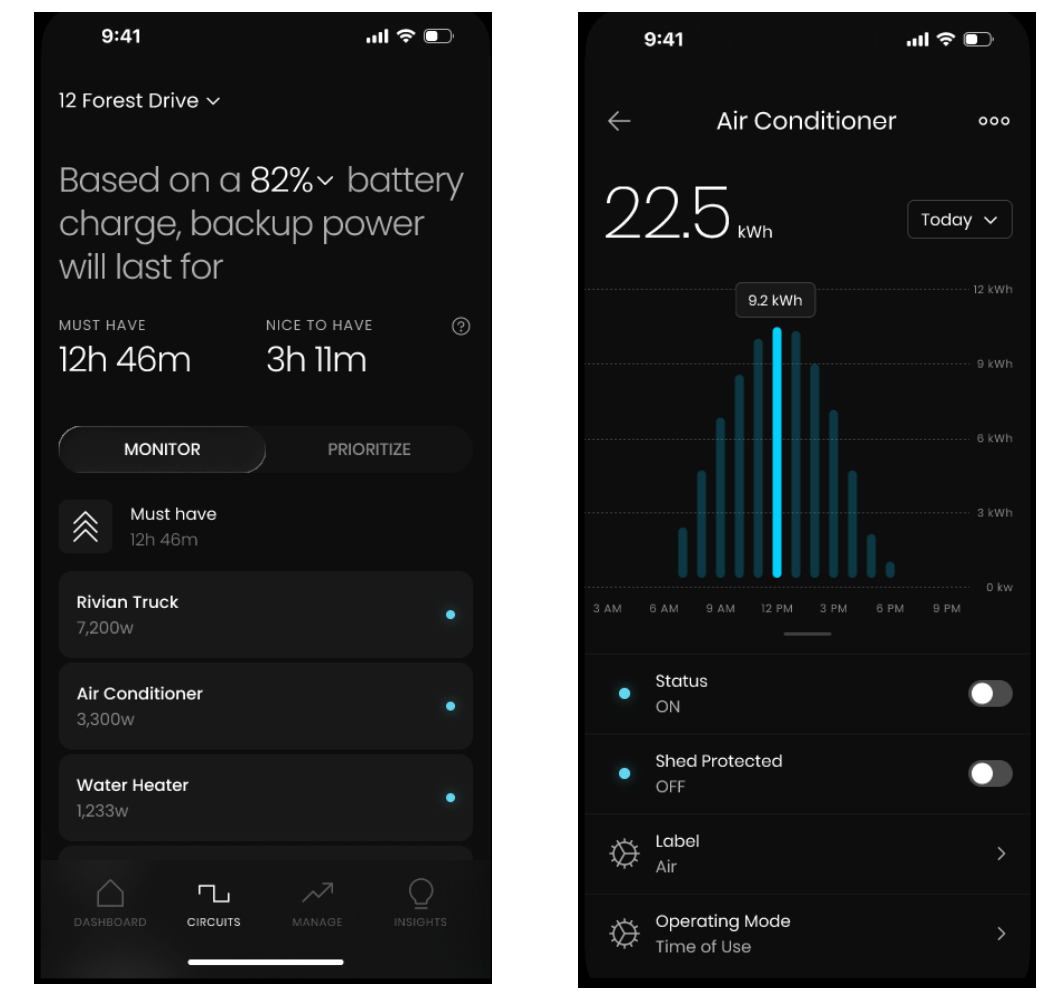
Viewing Energy by Circuit
- Open the Kora app.
- Tap CIRCUITS in the bottom navigation bar.
- The MONITOR tab shows all 12 circuits with real-time wattage.
- Tap any circuit to view its detailed usage history and trends.
This makes it easy to spot:
- Always-on loads
- Unexpected spikes
- High-consumption appliances
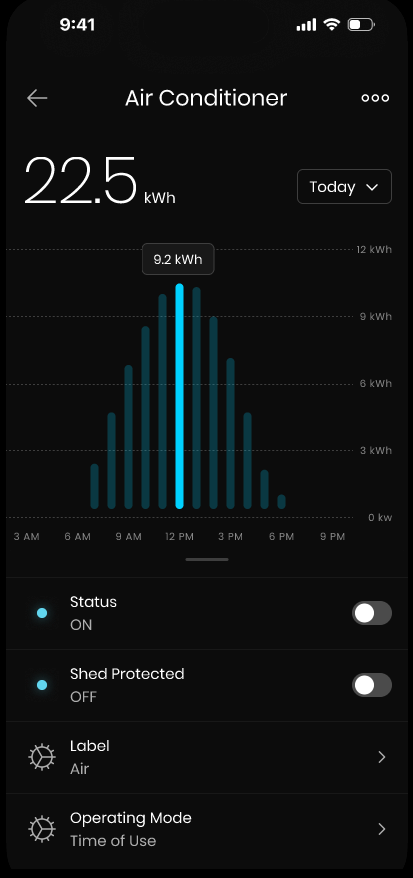
Controlling Circuits Remotely
Controlling Circuits Remotely
Kora lets you control individual circuits remotely using the app. Whether you’re home or away, you decide what’s powered.
What You Can Control
- Lights
- Outlets
- Appliances
- EV chargers
- Non-essential loads
How to Control a Circuit
- Open the Kora app.
- Tap CIRCUITS in the bottom navigation.
- In the MONITOR tab, select the circuit you want to control.
- Toggle the STATUS switch to turn it ON or OFF.
Changes take effect immediately.
When Is This Useful
- Turning off forgotten appliances
- Reducing usage during peak rates
- Managing loads during outages
- Preparing your home before you arrive
Safety Notes
- Critical circuits (medical devices, safety systems) should remain on
- Circuit control does not override electrical protections
Navigating the Kora App dashboard
Navigating the Kora App
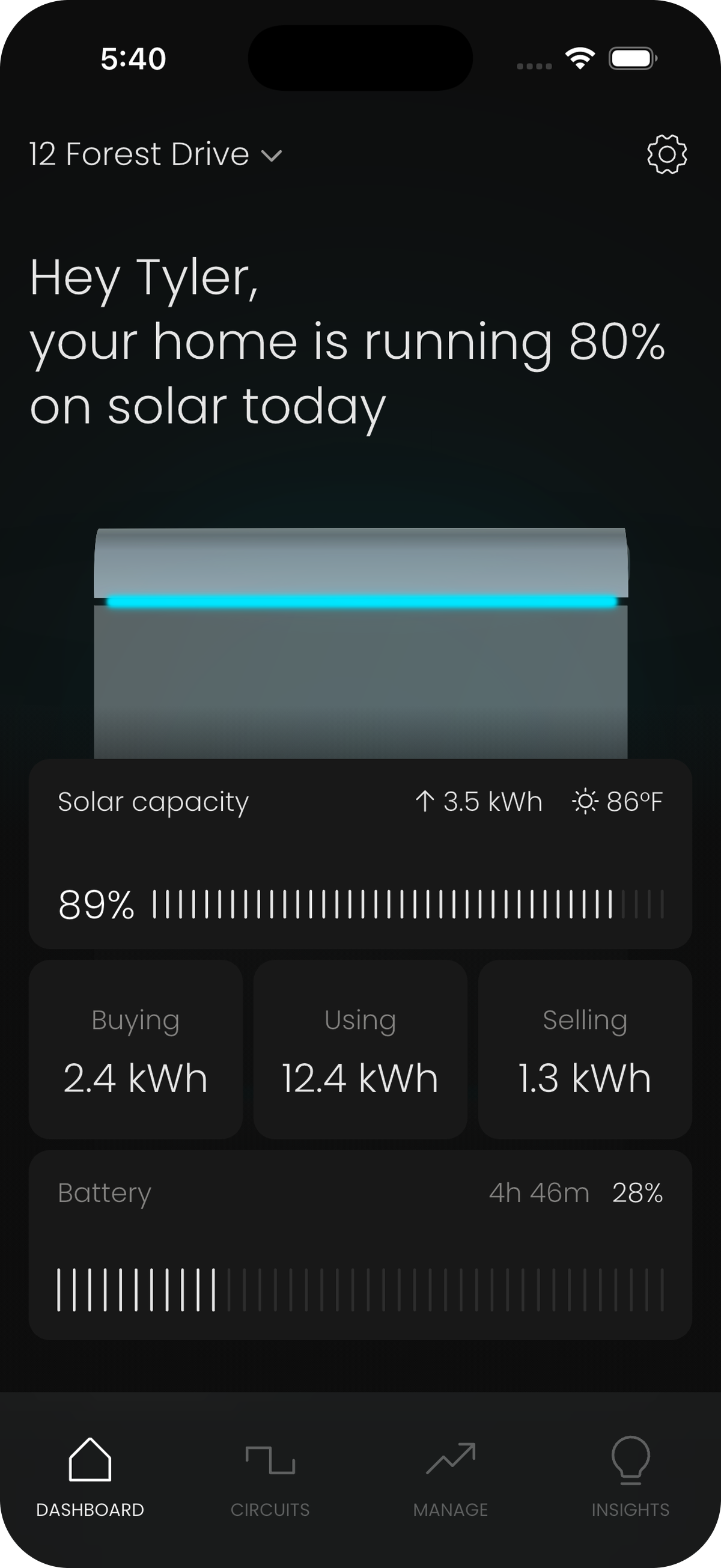
The Kora app is your control center for monitoring, managing, and optimizing your home’s energy. This guide walks you through the app’s structure so you can find what you need quickly.
Bottom Navigation
The app has five main tabs in the bottom navigation bar:
- HOME (Dashboard): Your at-a-glance view of energy flow, system status, battery level, and quick actions. Shows real-time power flow between grid, solar, battery, and home loads.
- CIRCUITS: View and control individual circuits. Has two sub-tabs: USAGE (real-time power per circuit with on/off toggles) and PRIORITY (backup priority assignments).
- MANAGE: Configuration and detailed views for your energy system. Has its own sub-navigation with four icons: Home, Solar, Battery, and Settings.
- INSIGHTS: Historical data, savings reports, energy trends, and carbon impact metrics.
- MORE: System configuration, network settings, firmware updates, and account management.
Inside the MANAGE Tab
The Manage tab has its own sub-navigation at the top of the screen:
- Home: Insights to your homes energy usage and trends within a specified time period you set, top energy users, and some battery performance information.
- Solar: Solar production details, inverter status, and PV performance.
- Grid: Grid usage insights and independence gauge
- Battery: Battery state of charge, backup time remaining, charge/discharge chart, and access to Energy Strategy configuration.
Key Screens to Know
- Energy Strategy: Access via MANAGE → Battery → Energy Strategy. This is where you configure your operating mode (Self-Power, Time-of-Use, or Backup Standby), set your battery backup reserve, and configure your utility rate plan.
- Circuit Detail: Tap any circuit in the CIRCUITS → USAGE tab to see its individual detail view with ON/OFF toggle, daily usage graph, and trend comparison (e.g., "You’re using 22% less energy than yesterday").
Energy Management
These articles explain how Kora intelligently manages power across your home -- optimizing solar and battery usage, protecting circuits, handling outages, enforcing grid limits, and enabling advanced programs like Virtual Power Plants.
Virtual Power Plant (VPP) Participation Explained
How a VPP Works
- Utilities send demand signals
- Kora responds by briefly exporting or reducing load
- Many homes act together like one large power source
What Kora Controls
- Participation is opt-in
- Backup reserves are always protected
- Events are time-limited and automated
Benefits of Participating
- Earn incentives or credits (where available)
- Get energy at lower rates
- Support grid stability
- Maximize the value of your battery system
Your Control
You can:
- Enable or disable participation at any time
- Set minimum battery reserve levels
- Review event history in the app
How the Kora Smart Panel Manages the Powerblocks
How Charging Works
Kora charges batteries when:
- Solar production exceeds home usage
- Electricity rates are low (Time-of-Use)
- Backup reserves need to be restored
How Discharging Works
Kora uses battery energy when:
- Utility rates are high
- The grid goes down
- You’ve enabled energy optimization modes
Built-In Safeguards
- Minimum reserve levels are always maintained
- Batteries are protected from over-discharge
- Charge rates are managed to extend battery life
Your Control
You can adjust:
- Backup reserve levels
- PV Self-consumption
- Time-of-Use behavior
- Participation in advanced programs (like VPPs)
Understanding Grid Export Limits
What Are Export Limits?
Export limits are utility-defined caps on how much power your system can send back to the grid at any moment.
They are common under:
- Net Energy Metering (NEM)
- California Rule 21
- IEEE 1547 interconnection rules
How Kora Handles Export Limits
- Limits are set during commissioning
- Kora monitors export in real time
- Excess energy is redirected to batteries or reduced automatically
What You Don’t Need to Worry About
- Manual settings
- Violating interconnection rules
- Utility penalties due to over-export
Kora always stays within approved limits.
How Kora Optimizes Solar Self-Consumption
How Solar Optimization Works
When solar is producing:
- Power is first used to run your home.
- Excess energy charges your battery (if installed).
- Only remaining energy is exported to the grid—within allowed limits.
Kora makes these decisions continuously, every few seconds.
Why This Matters
- Less energy sold back at low rates
- More savings from energy you already own
- Reduced reliance on the grid
What You Don’t Need to Do
- No manual switching
- No daily adjustments
- No solar scheduling
Kora adapts automatically based on real-time conditions.
Safety & Compliance
These articles explain how Kora is designed to protect people, property, and the grid. Learn how built-in hardware and software safeguards work together to meet electrical codes, safety standards, and emergency requirements—and what to do in normal and emergency conditions.
Surge Protection and Grounding
Grounding and Bonding
• Grounding and bonding must comply with NEC Article 250
• Neutral and ground configuration must match system design
• All grounding conductors must be properly sized and terminated
Surge Protection
• Surge protection devices (SPDs) may be installed upstream or at service equipment
• Kora-compatible installations must maintain bonding continuity
• Surge events do not affect Kora’s core safety protections
Fire Safety and Rapid Shutdown
Rapid Shutdown (RSD)
• RSD is provided by PV inverters or module-level devices
• Required by NEC 690 for firefighter safety
• Kora does not generate or bypass RSD signals
Kora’s Role
• Kora respects inverter shutdown states
• Does not interfere with PV rapid shutdown behavior
• Continues to isolate loads safely during emergencies
Fire Safety Best Practices
• Clearly label PV and battery systems
• Maintain required working clearances
• Ensure emergency responders can identify disconnects
Emergency Shutdown Procedures
Emergency Shutdown Steps
- Open the Smart Panel door.
- Use the service disconnect or upstream breaker to de-energize the panel.
- Verify zero voltage before servicing.
Important Safety Notes
• Never remove CTs or communication wiring while energized
• Follow lockout/tagout procedures as required
• Backup systems may still be energized until isolated
UL, IEEE, and NEC Compliance Overview
Key Standards
• UL 67 – Panelboards
• UL 1741 SA – Grid-interactive equipment
• UL 3141 / UL 916 – Control and safety systems
• IEEE 1547 – Interconnection and grid response
• NEC (NFPA 70) – Electrical installation requirements
What This Means
• Code-compliant installations
• Predictable inspection outcomes
• Utility-ready interconnection behavior
Arc-Fault (AFCI) and Ground-Fault (GFCI) Protection
AFCI Protection
• Detects arcing faults that can cause fires
• Required in many residential circuits per NEC 210
• Provided by the breaker—not software
GFCI Protection
• Protects against shock hazards
• Required for bathrooms, kitchens, outdoors, garages, and similar locations
• Implemented through GFCI or dual-function breakers
Important Notes
• Kora does not replace AFCI or GFCI breakers
• Breakers must be installed and wired per manufacturer instructions
Overcurrent Protection in the Kora Smart Panel
How Overcurrent Protection Works
Kora combines:
- Traditional Circuit Breakers
- Primary protection against overloads and short circuits, per NEC.
- Per-Circuit Hardware Relays
- Each controlled circuit includes a relay that can open instantly when unsafe conditions are detected.
- Real-Time Software Monitoring
- Continuous monitoring of current, voltage, and temperature across circuits.
If any layer detects a fault, the circuit is safely disconnected.
What This Means for You
• Faster fault response
• Reduced risk of overheating
• No single point of failure
Kora always fails safe.
Warranty & Support
These articles explain how Kora supports you after installation—from warranty coverage and service requests to working with authorized installers and responsibly retiring equipment at end of life.
End-of-Life & Recycling Guidelines
General Guidelines
• Do not dispose of electrical equipment in household trash
• Follow local regulations for electronic waste (e-waste)
• Batteries must be recycled through approved programs
Kora System Components
• Smart Panels and electronics should be handled by qualified professionals
• Batteries must be de-energized and removed safely
• Labels and serial numbers should remain intact during disposal
Getting Help
If you’re unsure how to retire or recycle your system, contact Kora Support for guidance or referrals to approved recycling partners.
Contacting Kora Support
Support Channels
• In-app chat (fastest for system-related questions)
• Email support
• Phone support (availability may vary by region and hours)
Best Practices for Faster Support
• Use the Kora app when possible so system data is included
• Be specific about symptoms and timing
• Avoid resetting hardware unless instructed
Emergency Situations
For electrical emergencies or safety concerns, contact a licensed electrician or emergency services first. Kora Support does not replace emergency response.
How to Request Service or Replacement Parts
Before You Contact Support
Please have the following ready:
• Site address
• System serial number
• Description of the issue
• Photos or screenshots (if applicable)
Service Request Process
- Contact Kora Support using one of the approved channels.
- Support will review logs and system data remotely when possible.
- If hardware service is required, replacement parts or next steps will be provided.
Replacement Parts
• Only Kora-approved replacement parts are supported
• Some replacements may require an authorized installer
• Warranty status will be verified before shipment
What’s Covered Under Your Kora Warranty?
What’s Covered
• The Kora Smart Panel and internal control electronics
• Manufacturing defects in hardware components
• Failures occurring under normal, intended operating conditions
Coverage periods and terms vary by product and are defined in your warranty documentation.
What’s Not Covered
• Improper installation or wiring
• Damage from misuse, modification, or unauthorized repairs
• Issues caused by non-approved accessories or third-party equipment
• Damage from floods, fires, or other force majeure events
Important Notes
• Installation must be performed by a licensed electrician
• Internet connectivity is required for warranty validation
• Keeping firmware up to date is required for continued coverage
Click here for the full Warranty.